Use past transactions as the input.
Bayonet · Fintech · B2B SaaS
Making fraud rules easier to build and verify
Bayonet helps enterprise teams catch fraud in digital transactions. I led the redesign of its rules workflow so clients could set up, revisit and test rules before they went live.
Showing the full case study.
My role
Product Designer & Service Designer
Scope
Enterprise research · Rules workflow · Design leadership
Project status
Released · Incremental redesign
Project overview
Making fraud rules easier to build, test and manage. Bayonet helps enterprise teams identify potentially fraudulent transactions through configurable rules. Creating and maintaining those rules often required help from Support. Teams were also unsure how a rule might affect transaction acceptance.
I led the redesign of the rule management experience across research, product strategy and interaction design.
My role
Product Designer & Service Designer. I led two designers, conducted five one-on-one interviews with enterprise administrators and operations team members, and worked with Product, Engineering, Data Science and Support.
Research
We conducted five qualitative interviews and reviewed approximately 20 additional client comments. We also observed product usage and reviewed Hotjar, Analytics and Support tickets.
Users needed a clearer setup and confidence that a mistake would not hurt transaction acceptance.
Key insight
Users needed to understand the potential impact of a rule before activating it. Historical transaction data gave teams a way to evaluate proposed rules and estimate their possible effect on acceptance.
Design solution
- Guided rule creation
A step-by-step wizard replaced a dense configuration form.
- Clear rule ownership
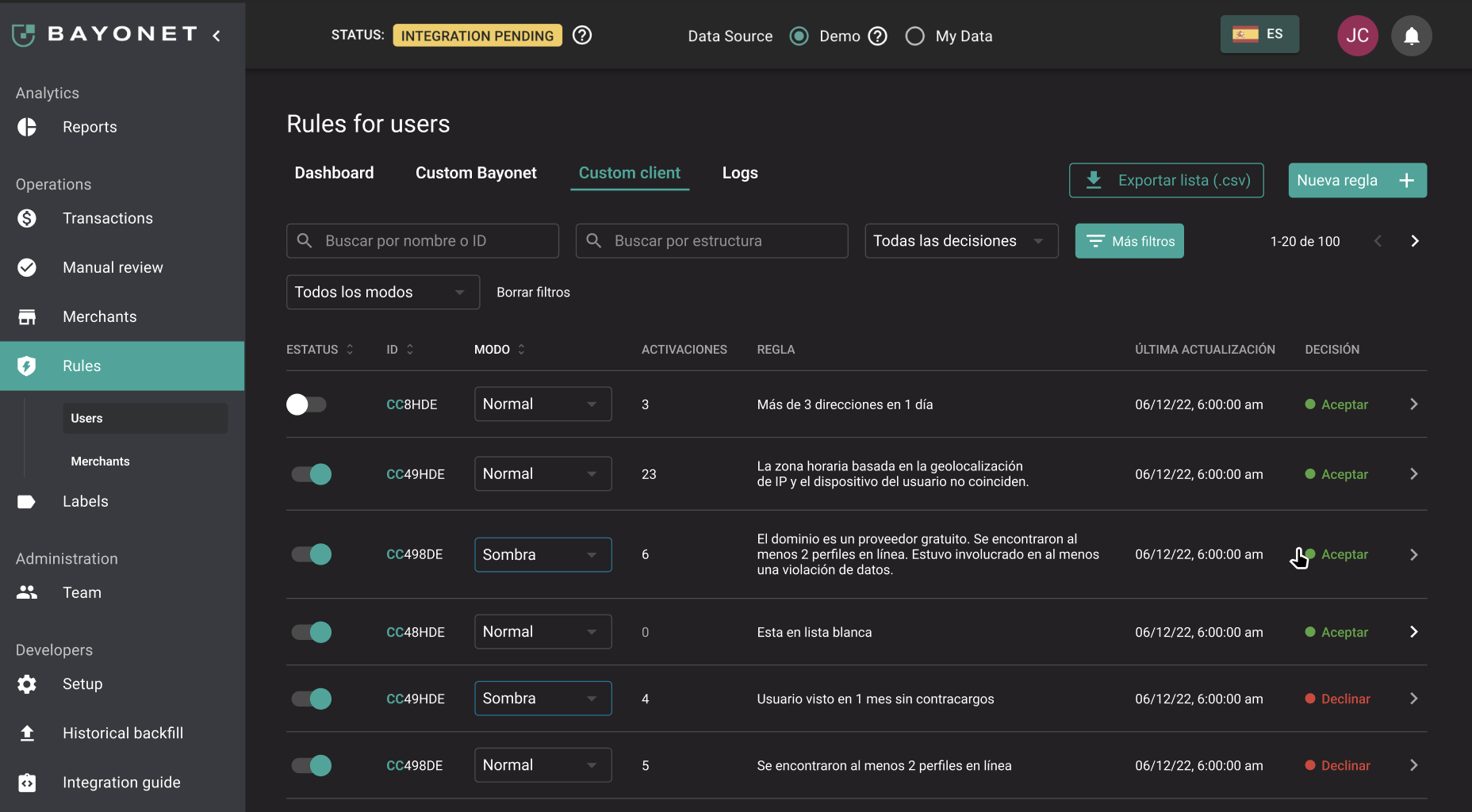
Bayonet-provided rules and client-created rules have distinct management paths.

- Safe customization
Clients can clone existing rules and edit their own copies while preserving the original Bayonet configuration.
- Historical testing
Teams can evaluate proposed rules against past transactions to see how many would have matched and what decisions they would have produced.
- Monitoring and execution modes
Normal Mode, Shadow Mode, activation history and change logs support day-to-day rule operation and traceability.
Validation
Support and one client participated in a beta of the proposals. Data Science and Support reviewed technical feasibility and potential operational impact.
Outcome
Approximately 30% more rules created
Data Science reported the increase three months after implementation.
We also observed greater client autonomy and fewer support requests related to rule creation.
My takeaway
Designing complex financial products starts with understanding the underlying business logic. Making potential consequences visible gives users confidence before their decisions affect real transactions.
How did we get there?
01 — Context and problem
How fraud teams turn a policy into a rule
Bayonet is a B2B fraud prevention platform. Administrators and operations teams use rules to define which transactions to flag and what should happen when those conditions match.
Creating a rule often meant getting help from Support. Our goals were to make rules easier to create and edit, give administrators more autonomy and reduce the time Support spent configuring rules. Users also needed to understand what a rule could do before it affected live transactions.
02 — Research and discovery
Understanding why clients hesitated to create rules
Qualitative research. I conducted five one-on-one video interviews with administrators and operations team members from large client organizations. Bayonet’s overall client base was still small. I also observed how clients used Bayonet.
Complementary sources. We reviewed approximately 20 additional client comments about difficulty creating rules, alongside Hotjar, Analytics and Support tickets.
What we observed
- Clients were unsure how to turn a fraud policy into rule conditions.
- They worried that a configuration mistake could significantly lower transaction acceptance.
- Existing rules were difficult to understand and document.
I led two designers across research and design. We documented the findings and presented proposals to the team. Data Science and Support helped us check whether the proposals were technically feasible and could fit existing operations without creating new problems.
03 — Key insights
A rule had to be easy to build and safe to evaluate
Make the setup feel manageable
Some participants compared rule creation with tasks they found easier, such as installing software or uploading a video to YouTube. Their comparisons pointed to the value of a clear sequence when a task involves several decisions.
Show the possible impact before asking users to commit
An estimate of the acceptance rate based on historical transactions helped clients feel more confident about a rule’s configuration. It gave them a way to judge possible impact before enabling the rule.
04 — Design strategy
Preserve the logic and make each decision clearer
How might we make fraud rule configuration understandable and trustworthy without oversimplifying the underlying risk logic?
My main challenge was to understand and document the underlying logic so we could make rules easier to create and edit. We separated rule ownership, guided setup, pre-activation evaluation and post-activation monitoring so each answered a different question.
View the original Rule detail sketch (PDF) ↗
Validate the workflow before release
Support and one client participated in a beta of the proposals. We wanted to learn whether clients could configure and review rules in the redesigned workflow without introducing new operational problems. I worked with Product and Engineering to implement the design in the existing dashboard.
05 — Rule management
Make ownership visible from the rules dashboard
The dashboard gives teams an overview of rule activity and two entry points. Custom Bayonet contains rules Bayonet provides for the organization. Clients can inspect and deactivate them, while their conditions remain protected. Custom Client contains rules the client can create and edit.
Compare the Bayonet and client rule libraries
06 — Guided rule creation
Turn one dense form into a sequence of decisions
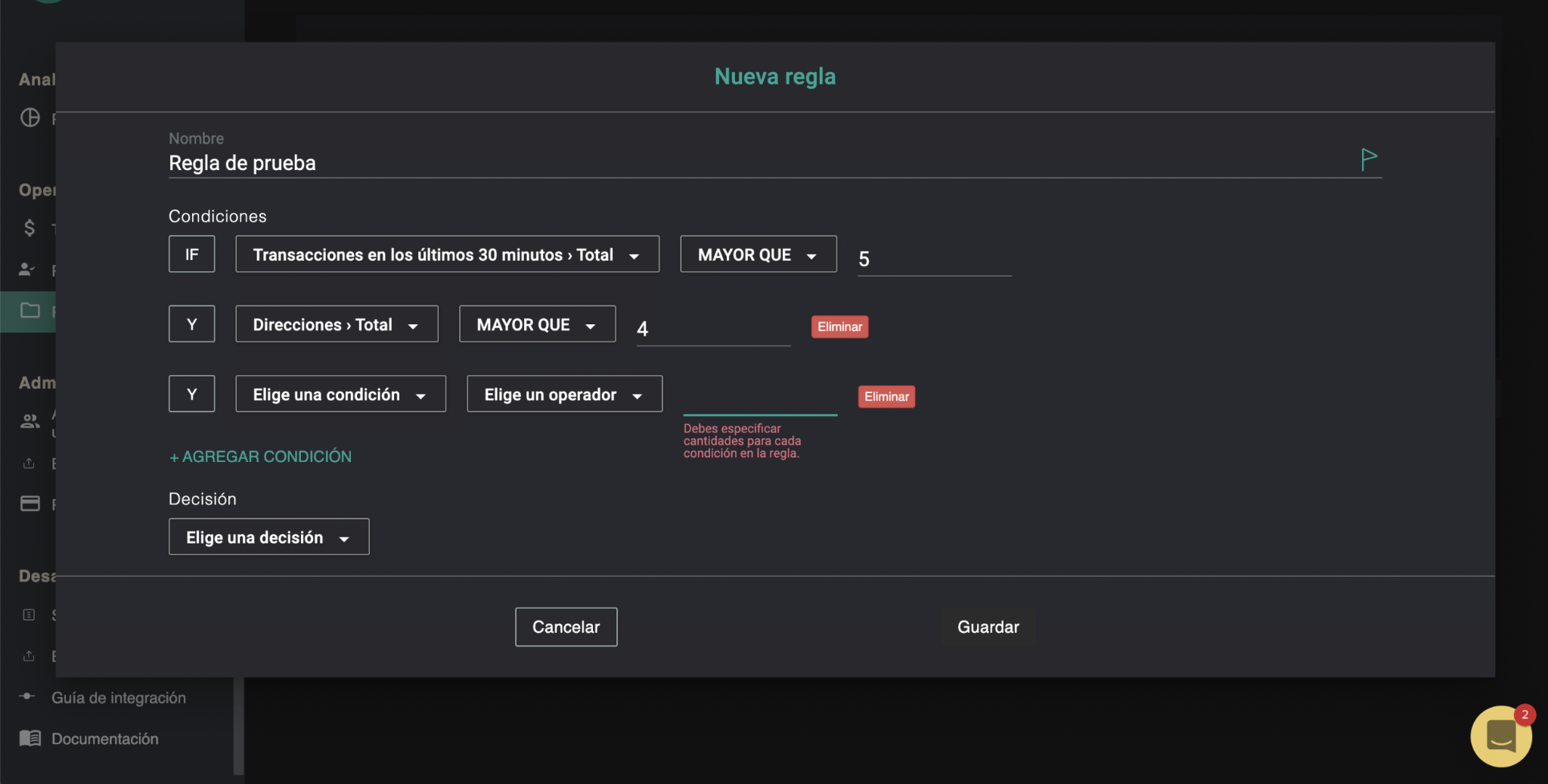
The original form asked users to name the rule, define conditions and choose a response on one screen. I led the move to a wizard that shows progress and lets users review the logic one decision at a time.
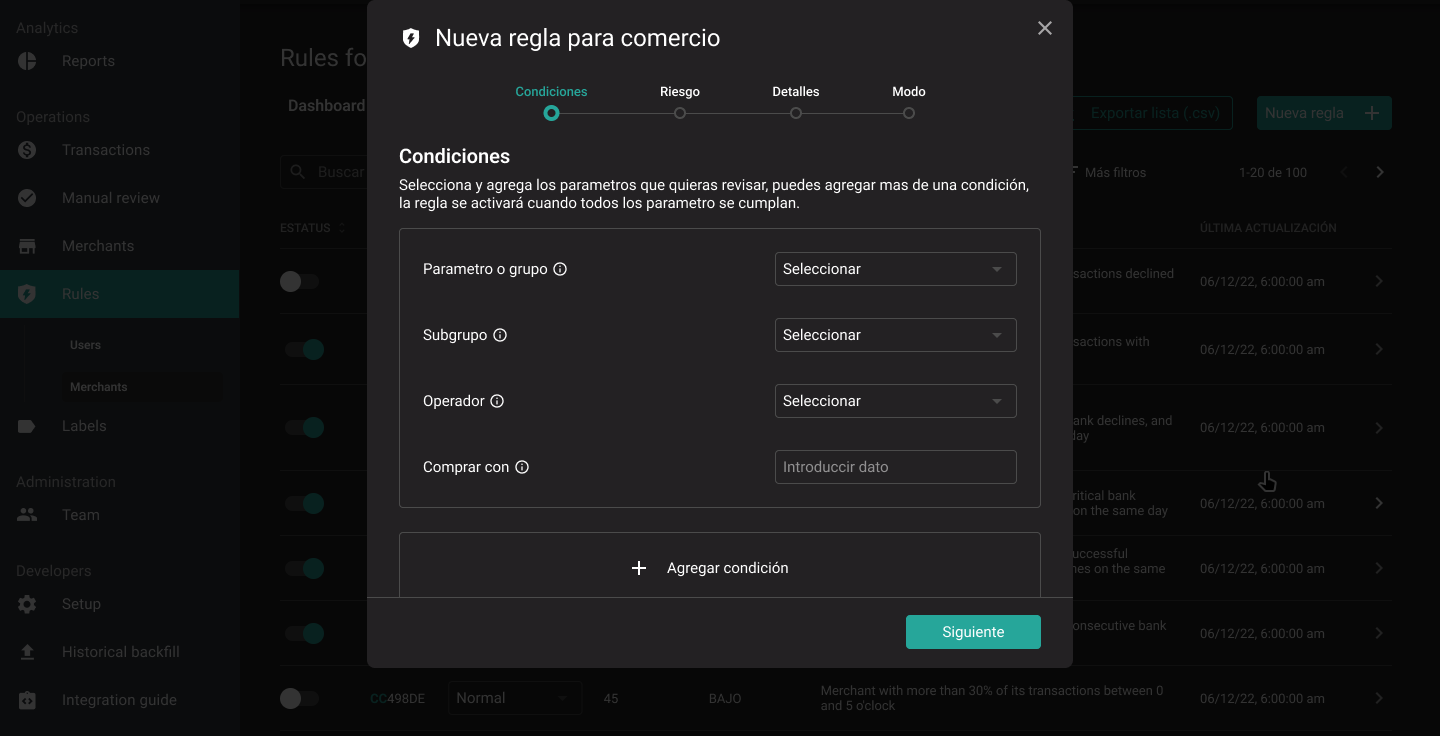
Clarify alert severity and execution mode
Next, clients define the risk level associated with the alert (High, Medium or Low). This makes the severity of a matching rule explicit before they define its scope and execution mode.
The Details step captures the rule’s name and scope.
At activation, Normal Mode can affect live decisions, while Shadow Mode evaluates the rule on incoming transactions without affecting the decision.
See an extra condition and required-field feedback
Compare the two activation confirmations
Pick up unfinished work or revise an existing rule
A draft preserves an unfinished setup so clients can resume it later. Editing starts from an existing client rule and keeps the current configuration in view as users decide what to change.
07 — Safe customization
Adapt a rule while protecting the original
Bayonet-provided conditions are read-only. Cloning gives clients a separate rule they can name and edit. The copy identifies its source so administrators can see where the configuration came from.
View the confirmation after creating a copy
08 — Historical testing
Evaluate a proposed rule before activation
Historical testing applied a proposed rule to past transactions. Clients could see how many transactions would have activated the rule, inspect the decisions it would have taken and use those results to estimate the possible effect on acceptance. That estimate helped teams decide whether to refine the configuration before activation.
01 — Historical transactions 02 — Rule evaluation Apply the proposed conditions and decision logic to those transactions.
03 — Activation count and decisions Count the matches and show the decisions the rule would have taken.
04 — Review before activation Assess the possible effect on acceptance and refine the rule if needed.
09 — Monitoring and traceability
See what the rule did and what changed
Activation history shows when a rule matched and what happened on those transactions. The change log shows configuration changes, when they were made and who made them. Historical testing answers a separate question by evaluating a proposed configuration against past transactions.
After rollout
Approximately 30% more rules created
Data Science reported the increase three months after implementation.
We also observed greater client autonomy and fewer support requests related to rule creation.
10 — Learnings and reflection
Make each decision visible before it affects a transaction
I learned how much work it takes to understand and document rule logic before simplifying the interface. Working with Data Science and Support helped me see where a design could introduce operational problems, even if it looked straightforward on screen.
The research reinforced that user confidence matters as much as ease of use when a setting can affect live transactions. Designing complex financial products means translating business and technical logic into decisions people can understand.
Just need the key points?